Skip to content
  • Search
Skins
  • Light
  • Brite
  • Cerulean
  • Cosmo
  • Flatly
  • Journal
  • Litera
  • Lumen
  • Lux
  • Materia
  • Minty
  • Morph
  • Pulse
  • Sandstone
  • Simplex
  • Sketchy
  • Spacelab
  • United
  • Yeti
  • Zephyr
  • Dark
  • Cyborg
  • Darkly
  • Quartz
  • Slate
  • Solar
  • Superhero
  • Vapor

  • Default (No Skin)
  • No Skin
Collapse

ZMT zurich med tech

  1. Home
  2. Sim4Life
  3. Python API
  4. Delete Simulation and Results

Delete Simulation and Results

Scheduled Pinned Locked Moved Python API
13 Posts 4 Posters 7.0k Views 4 Watching
  • Oldest to Newest
  • Newest to Oldest
  • Most Votes
Reply
  • Reply as topic
Log in to reply
This topic has been deleted. Only users with topic management privileges can see it.
  • L Offline
    L Offline
    LJ
    wrote on last edited by
    #1

    Hi,

    Does anyone know how to delete a simulation and its results using the Python API?

    Thanks!

    SylvainS 1 Reply Last reply
    0
    • D Offline
      D Offline
      daolin_qu
      wrote on last edited by
      #2

      Why use Python api

      1 Reply Last reply
      0
      • L LJ

        Hi,

        Does anyone know how to delete a simulation and its results using the Python API?

        Thanks!

        SylvainS Offline
        SylvainS Offline
        Sylvain
        ZMT
        wrote on last edited by
        #3

        @lj said in Delete Simulation and Results:

        Hi,

        Does anyone know how to delete a simulation and its results using the Python API?

        Thanks!

        Hi Lj,

        the commands below should help:

        import s4l_v1.document as document
        sim = document.AllSimulations[0]    # access by index, starting with 0
        #sim = document.AllSimulations["my_simulation"]    # access by name
        
        sim.ClearResults()  # delete results
        
        sim.ResetVoxels()  # delete voxels
        
        document.AllSimulations.Remove(sim)   # remove simulation from project
        
        1 Reply Last reply
        0
        • L Offline
          L Offline
          LJ
          wrote on last edited by
          #4

          Thank you @Sylvain!

          SylvainS 1 Reply Last reply
          0
          • L LJ

            Thank you @Sylvain!

            SylvainS Offline
            SylvainS Offline
            Sylvain
            ZMT
            wrote on last edited by
            #5

            @lj said in Delete Simulation and Results:

            Thank you @Sylvain!

            you're welcome!

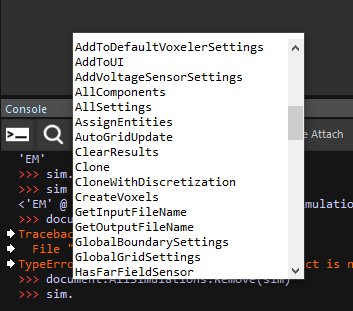
            I would also recommend using the auto-completion feature in the Console. For example, if you type

            sim=document.AllSimulations[0]
            

            to assign the sim variable and then sim followed by a . (dot) , you should see all the functions that you can use with this simulation object. Usually easier than trying to remember all of them 🙂
            3127303b-04eb-4862-b597-5838bf435174-image.png

            1 Reply Last reply
            0
            • L Offline
              L Offline
              LJ
              wrote on last edited by
              #6

              Yeah, I do use it. Its very helpful! I guess the mistake I was making was trying to find the delete/ remove within sim rather than document.allsimulations.

              1 Reply Last reply
              0
              • SylvainS Offline
                SylvainS Offline
                Sylvain
                ZMT
                wrote on last edited by
                #7

                yes, that one is not very obvious indeed. A hint might be given by looking at how simulations are "added" to the project (see for example the auto-generated code when you select a simulation and click "To-Python").

                1 Reply Last reply
                0
                • L Offline
                  L Offline
                  LJ
                  wrote on last edited by
                  #8

                  That makes sense- thank you!

                  1 Reply Last reply
                  0
                  • M Offline
                    M Offline
                    michaelsch
                    wrote on last edited by
                    #9

                    sim.ClearResults() # delete results
                    sim.ResetVoxels() # delete voxels
                    document.AllSimulations.Remove(sim) # remove simulation from project

                    after adding this lines i got this error :
                    Analysis : [Warn] Results Were Deleted
                    Analysis : [Warn] Results are not ready and simulation could not be located
                    Analysis : [Error] sim 2: Failed to compute output attributes
                    Analysis : [Warn] Results are not ready and simulation could not be located
                    Analysis : [Error] sim 2: Failed to compute output attributes
                    Analysis : [Error] Overall Field: Could not update input attributes
                    Analysis : [Warn] Results are not ready and simulation could not be located
                    Analysis : [Error] sim 2: Failed to compute output attributes
                    Analysis : [Error] Overall Field: Could not update input attributes
                    Analysis : [Error] EM E(x,y,z,f0) - Slice Viewer: Could not update input attributes
                    Analysis : [Warn] Results are not ready and simulation could not be located
                    Analysis : [Error] sim 2: Failed to compute output attributes
                    Analysis : [Error] Overall Field: Could not update input attributes
                    Analysis : [Error] EM Potential(x,y,z,f0) - Slice Viewer: Could not update input attributes
                    Analysis : [Warn] Results are not ready and simulation could not be located
                    Analysis : [Error] sim 2: Failed to compute output attributes
                    Analysis : [Error] Overall Field: Could not update input attributes
                    Analysis : [Error] EM E(x,y,z,f0) - Streamline Viewer: Could not update input attributes

                    1 Reply Last reply
                    0
                    • M Offline
                      M Offline
                      michaelsch
                      wrote on last edited by
                      #10

                      also h5 output files disappear !

                      1 Reply Last reply
                      0
                      • L Offline
                        L Offline
                        LJ
                        wrote on last edited by
                        #11

                        can you provide a bit more detail about what you're trying to do?

                        1 Reply Last reply
                        0
                        • M Offline
                          M Offline
                          michaelsch
                          wrote on last edited by
                          #12

                          i load several meshes one of them is moving and also each time it transmit other frequency, so for each state i need different simulation (sweep not good for me)

                          1 Reply Last reply
                          0
                          • L Offline
                            L Offline
                            LJ
                            wrote on last edited by LJ
                            #13

                            Hmm I am not sure I understand. Is it possible to share more of your code and explain exactly what is not working?

                            I use the lines of code you posted regularly and it works just fine.

                            1 Reply Last reply
                            0

                            Hello! It looks like you're interested in this conversation, but you don't have an account yet.

                            Getting fed up of having to scroll through the same posts each visit? When you register for an account, you'll always come back to exactly where you were before, and choose to be notified of new replies (either via email, or push notification). You'll also be able to save bookmarks and upvote posts to show your appreciation to other community members.

                            With your input, this post could be even better 💗

                            Register Login
                            Reply
                            • Reply as topic
                            Log in to reply
                            • Oldest to Newest
                            • Newest to Oldest
                            • Most Votes


                            • Login

                            • Don't have an account? Register

                            • Login or register to search.
                            • First post
                              Last post
                            0
                            • Search