AttributeError: 'NoneType' object has no attribute 'Results'
-
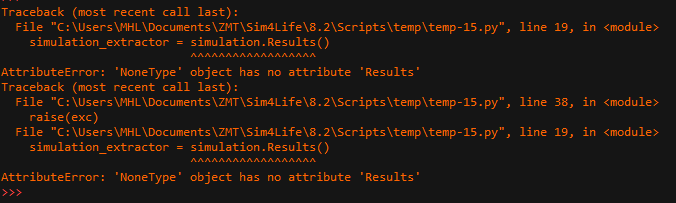
The simulation suddenly encountered this error, even though the same code was used previously without any issues.import numpy import s4l_v1.analysis as analysis import s4l_v1.document as document import s4l_v1.model as model import s4l_v1.units as units from s4l_v1 import ReleaseVersion from s4l_v1 import Unit try: # Define the version to use for default values ReleaseVersion.set_active(ReleaseVersion.version8_2) # Creating the analysis pipeline # Adding a new SimulationExtractor simulation = document.AllSimulations["0_17_35_29"] simulation_extractor = simulation.Results() # Adding a new EmSensorExtractor em_sensor_extractor = simulation_extractor["Overall Field"] em_sensor_extractor.FrequencySettings.ExtractedFrequency = u"All" document.AllAlgorithms.Add(em_sensor_extractor) # Adding a new CurrentExtractor inputs = [em_sensor_extractor.Outputs["EM Potential(x,y,z,f0)"], em_sensor_extractor.Outputs["J(x,y,z,f0)"]] current_extractor = analysis.extractors.CurrentExtractor(inputs=inputs) current_extractor.IsoSurfacePerCentThreshold = 30.0 current_extractor.UpdateAttributes() document.AllAlgorithms.Add(current_extractor) except Exception as exc: import traceback traceback.print_exc() # Reset active version to default ReleaseVersion.reset() raise(exc) -
Hi,
You would get that error if there was no simulation named "0_17_35_29" in the currently opened document. Maybe you should check what simulations you have in your project and if you do have a simulation with that name?One way to list all simulation names via python is to run something like:
for s in document.AllSimulations:
   print(s.Name)
Hello! It looks like you're interested in this conversation, but you don't have an account yet.
Getting fed up of having to scroll through the same posts each visit? When you register for an account, you'll always come back to exactly where you were before, and choose to be notified of new replies (either via email, or push notification). You'll also be able to save bookmarks and upvote posts to show your appreciation to other community members.
With your input, this post could be even better 💗
Register Login